At first glance, this might seem unnecessary. Surely you already know which attributes you’re using on your Active Directory objects?
In reality, that’s not always the case. And it matters more than you might think.
In large Active Directory environments, architecture and governance often evolve over time rather than by design. I’ve seen plenty of sizeable environments where processes were informal, documentation was patchy, and attribute usage simply grew organically. That works for a while. But when you sit down to formalise standards, you quickly run into a basic question: when we create an object in AD, which attributes are mandatory, and which ones are optional?
If you don’t have a clear answer, you can’t build meaningful governance around object creation.
The script below analyses user objects and identifies which attributes are populated with data, and which are not. From there, you can see what’s consistently set, what’s rarely touched, and what may need to be standardised. The same approach can be adapted for computer objects, groups, and other object types.
It’s worth noting that this is a resource-intensive script. It pulls all attributes for all users, so in a large environment it may take some time to run.
# Create an empty array to hold the results
[System.Collections.ArrayList]$allproperties = @();

# Get all users and all properties
$users= get-aduser -properties * -filter *;

# Loop through all users
foreach ($user in $users) {

	$availableproperties = $user.psobject.properties

	# Loop through all available properties
	foreach ($availableproperty in $availableproperties) {

		# Exclude non-attribute properties
		if (($availableproperty.name -ne "propertynames") -and ($availableproperty.name -ne "propertycount")) {

			# Exclude properties with empty or null values
			if (($availableproperty.value -ne $null) -and ($availableproperty.count -ne 0)) {

				# Add attribute name to results array
				$null = $allproperties.add($availableproperty.name)
			}
		}
	}
}

# Reduce list and display count by attribute name
$allproperties | group -noelement | ft count, name -autosize
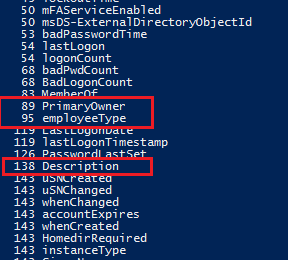
When I ran this on a small test environment with 143 users, the output showed the attribute count for each populated field.
As expected, 143 out of 143 accounts have a whenCreated attribute set. A few other attributes also appear to be in use across most accounts. Those are the ones that are worth documenting. If they’re consistently populated, they’re effectively part of your Standard, whether you’ve written that Standard down or not.